File comparison and merge, built for macOS Macのためのファイル比較・マージアプリ

MergeDock

Compare with clarity.
Merge with confidence.

違いを見やすく。
マージを迷いなく。

Compare text, folders, images and binary files without leaving your Mac. Edit two-way differences, resolve three-way conflicts, inspect very large files and work smoothly with Git.

テキスト、フォルダ、画像、バイナリをMac上で比較。2Wayの編集、3Wayの競合解決、超大規模ファイルの確認、Git連携まで、一つのアプリで落ち着いて進められます。

Free to start. Pro features are available as an in-app purchase. Requires macOS 26 or later.

無料で開始できます。Pro機能はアプリ内課金で利用できます。macOS 26以降が必要です。

Text · Folder · Image · Binary テキスト・フォルダ・画像・バイナリ One comparison workspace 比較作業を一つに集約
2-Way & 3-Way 2Way・3Way From review to merge 確認からマージまで
Very large files 超大規模ファイル Indexed viewing for very large files 大規模ファイルは索引表示
Local-first ローカルファースト Your file content stays on your Mac ファイル内容はMacの外へ送信しない

Changes are easier to review when everything stays in context.

変更は、前後の流れが見えるだけで、ぐっと確認しやすくなります。

MergeDock keeps source files, differences, merge actions, encodings and history together, so you can find the change, understand it, make the right edit and recover when needed without losing your place.

MergeDockは、原本、差分、マージ操作、文字コード、履歴を一つにまとめます。変更を見つけ、意味を確かめ、必要な修正を行い、困ったときは復旧する。その流れを、画面の中で見失わずに進められます。

01 / TEXT

See exactly what changed.

どこが変わったか、すぐわかる。

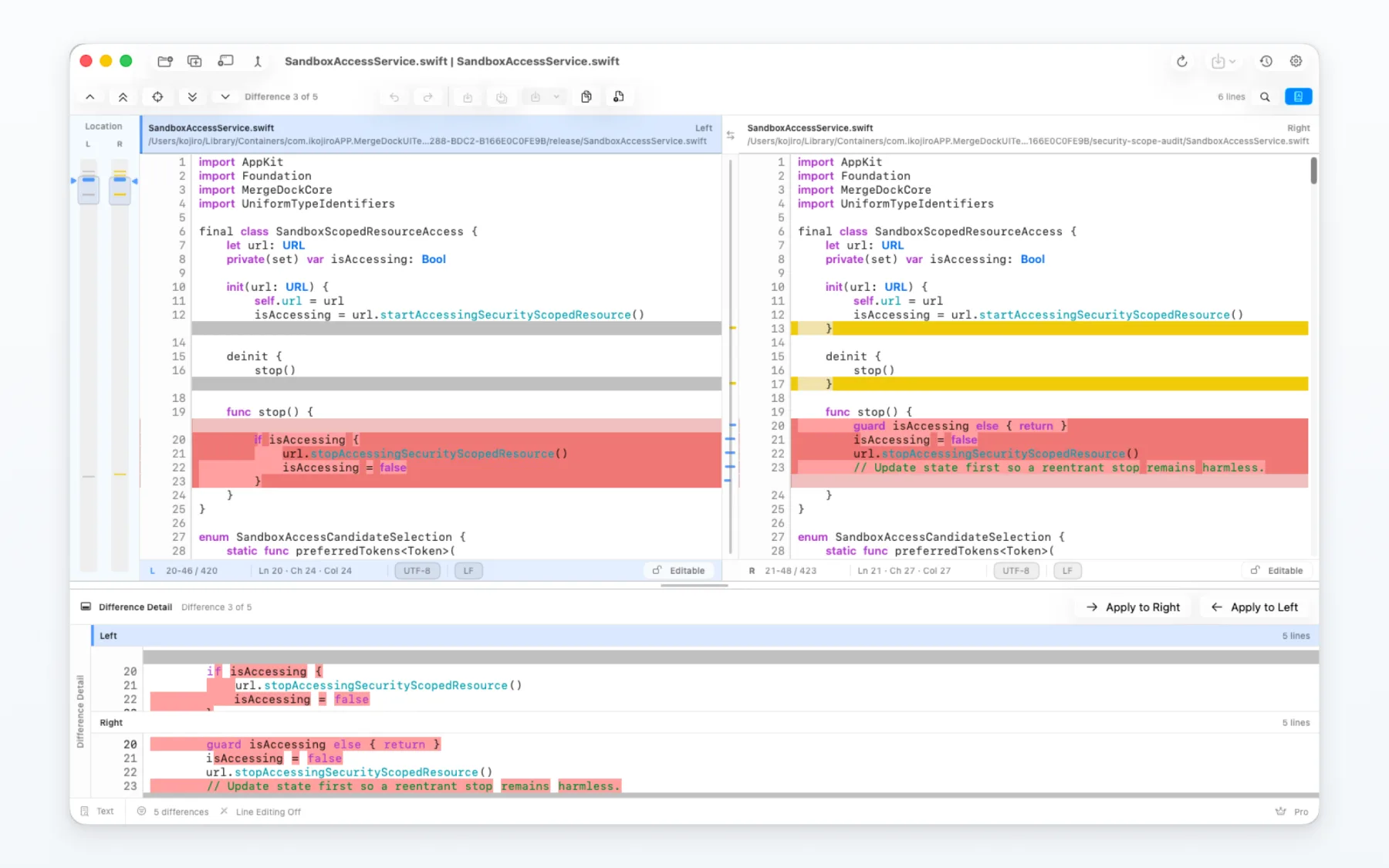
Synchronized panes, line and inline highlights, search, navigation, editing and encoding controls let you review a change and correct it in the same flow.

同期ペイン、行・行内差分、検索、差分移動、編集、文字コード設定を一つにまとめ、確認したその場で修正できます。

  • Two-way comparison with apply-left and apply-right operations
  • Search across panes with current and all-match highlighting
  • Encoding and line-ending inspection with explicit refresh
  • 左右反映を備えた2Way比較
  • 現在位置と全一致箇所を見分けられるペイン横断検索
  • 文字コード・改行コードの確認と明示的な表示更新
MergeDock two-way text comparison showing synchronized differences and detail panes
Two-way text comparison 2Wayテキスト比較 Synchronized overview, source and detail panes 位置・原本・差分詳細を同期表示
02 / FOLDERS

Review a whole folder without losing the thread.

フォルダ全体を見渡しながら、一つずつ確認。

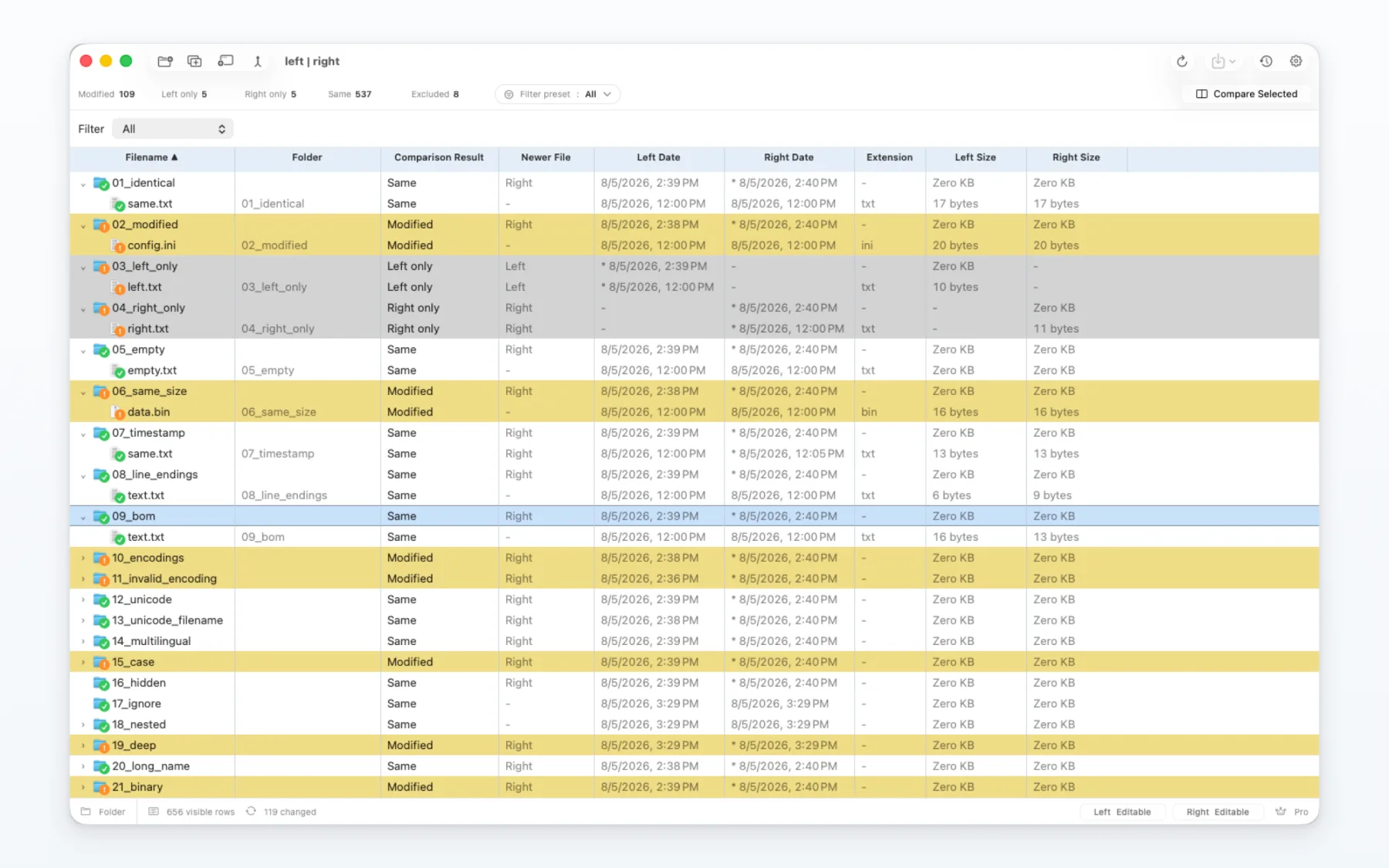
Compare nested folders, narrow the results, check metadata and open any file for a closer look. MergeDock asks before copy or delete operations change anything on disk.

階層フォルダを比較し、結果を絞り込み、メタデータを確認。気になるファイルは、そのまま詳しい比較へ進めます。コピーや削除でディスク上の内容が変わる前に、MergeDockが確認を求めます。

  • Clear states for identical, modified, one-sided and type-mismatch items
  • Reusable presets for source trees and generated content
  • File and folder operations with explicit confirmation
  • 一致・内容変更・片側のみ・種類不一致を明確に分類
  • ソースツリーや生成物に合わせた再利用可能なプリセット
  • 確認ダイアログを伴うファイル・フォルダ操作
MergeDock folder comparison showing a large structured project tree
Folder comparison フォルダ比較 Tree-aware filtering, status and metadata ツリー構造・フィルター・状態・メタデータ
03 / VISUAL

Compare images in the view that fits the job.

目的に合った表示で、画像の違いを確認。

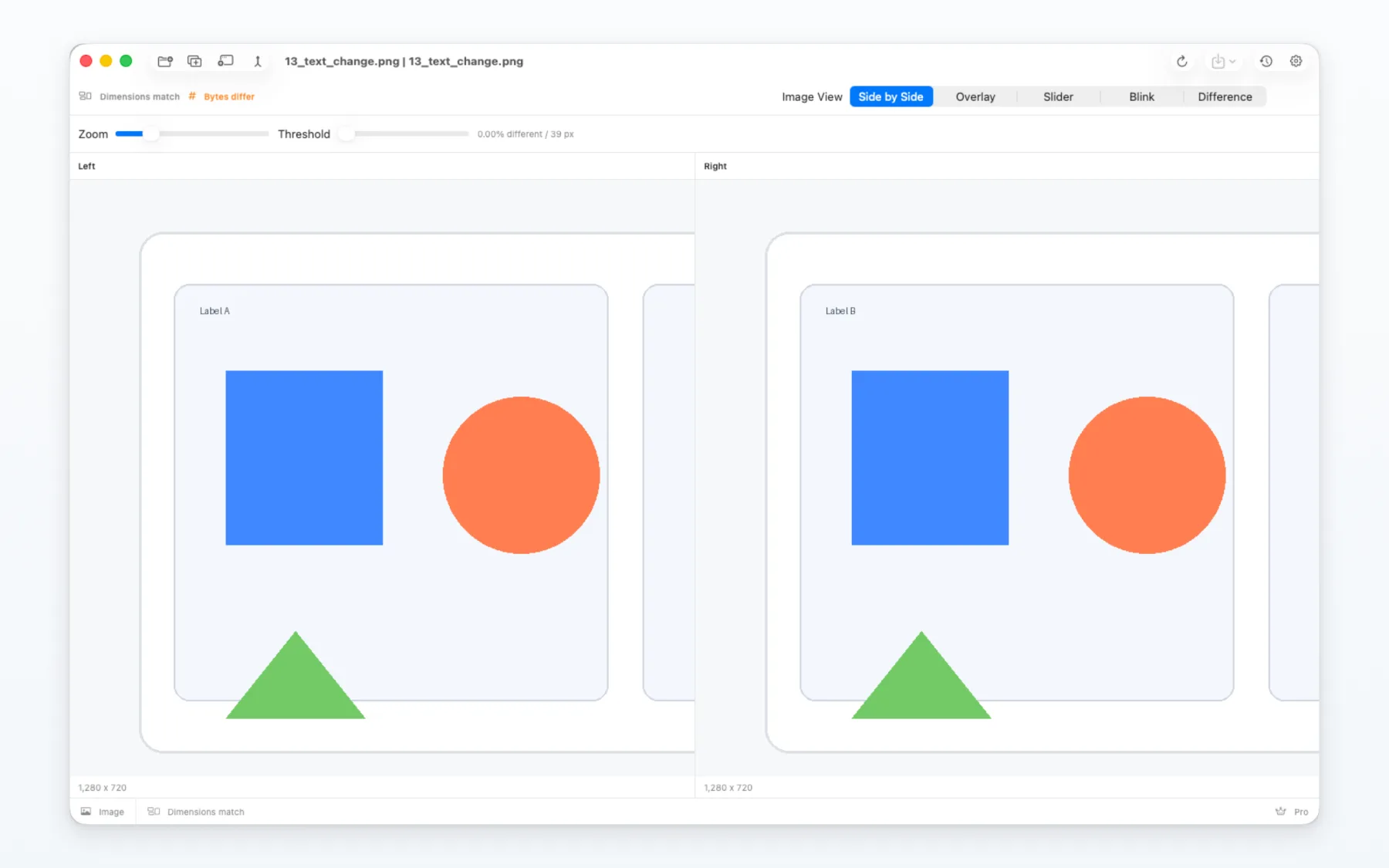
Check dimensions and pixel differences with side-by-side, overlay, slider, blink and difference views. Zoom and pan stay neatly inside the comparison area.

左右、重ね、スライダー、点滅、差分の各表示で、寸法とピクセル差を確認できます。ズームやパンも比較エリアの中で扱えます。

  • Multiple visual modes for different inspection tasks
  • Dimension and pixel-level mismatch status
  • Binary comparison for non-text files
  • 確認目的に応じた複数の画像表示モード
  • 寸法差・ピクセル差の状態表示
  • テキスト以外を確認するバイナリ比較
MergeDock image comparison in difference view
Image comparison 画像比較 Five inspection modes with zoom 5つの表示モードとズーム
04 / MERGE

Resolve conflicts with the full picture in view.

必要な情報を並べたまま、競合を解決。

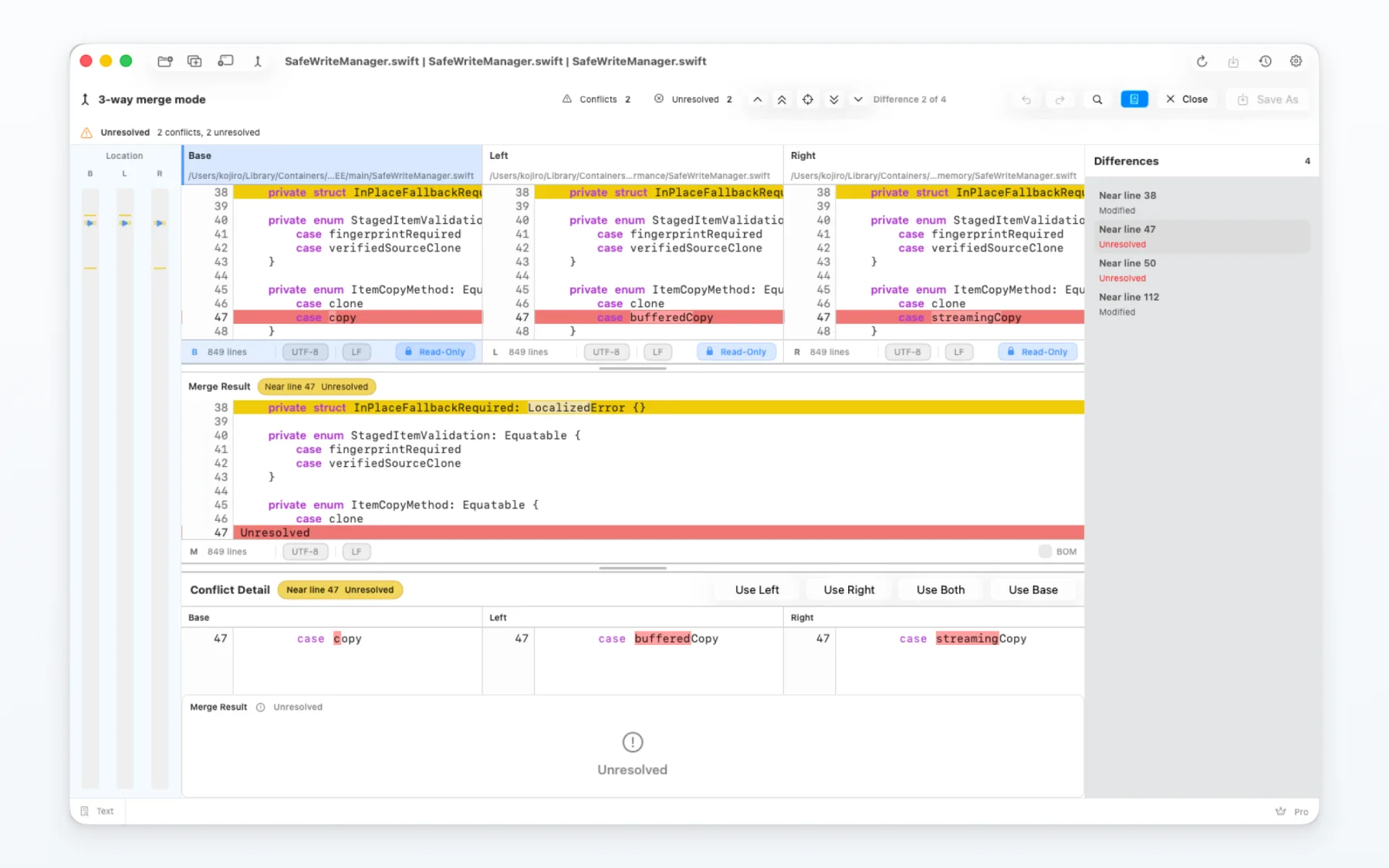
Base, left and right inputs stay synchronized with the merge result and conflict detail. Choose one side, combine both or edit the resolved result while the surrounding change remains visible.

基準・左・右の入力を、マージ結果と競合詳細に同期。周辺の変更を見ながら、片側採用、両方採用、解決後の編集まで進められます。

  • Manual three-way merge for any selected files
  • Git difftool and mergetool integration
  • Unresolved regions remain protected until a resolution is chosen
  • 任意ファイルで使える手動3Wayマージ
  • Git difftool・mergetool連携
  • 解決方法を選ぶまで未解決領域を保護
MergeDock three-way merge with base, left, right and merge result panes
Three-way merge 3Wayマージ Inputs, result and conflict detail in one view 入力・結果・競合詳細を一画面に表示

Made for everyday comparison work

日々の比較作業に

Built for comparisons that take more than a quick glance.

じっくり確認したい比較にも、きちんと応えます。

Scale-aware text engine

規模に応じるテキストエンジン

Small files remain fully interactive. Very large files use indexed access, so you can inspect the visible area without loading the entire document into the interface.

小さなファイルはそのまま軽快に操作。大きなファイルは索引方式へ切り替え、全文を画面へ展開せず、必要な範囲を確認できます。

Encoding & line-ending control

文字コード・改行コード制御

Check detected encodings, compare line endings and refresh how the current in-memory text is interpreted whenever you need to.

検出した文字コードを確認し、改行コードの違いも比較。必要なときは、原本を読み直さず、開いている内容の解釈だけを表示更新できます。

History, recovery & safe saves

履歴・復旧・安全な保存

Reopen recent comparisons, pin important sessions, notice external edits and recover eligible work after an interruption.

最近の比較を開き直し、重要なセッションをピン留め。外部変更を知らせ、中断した作業は復旧センターから戻せます。

Keyboard-first navigation

キーボード中心の移動

Move between differences, page through a file, jump to the beginning or end, search and refresh while keeping your focus on the comparison.

差分移動、ページ移動、先頭・末尾への移動、検索、表示更新を、比較画面から離れずに操作できます。

Designed to stay local

Macの中で完結

Your files stay on your Mac.

ファイルは、Macの中に。

On-device comparison

Mac上で比較

File content is processed locally and is not uploaded to an external comparison service.

ファイル内容はローカルで処理し、外部の比較サービスへアップロードしません。

Access only where you allow

許可した場所だけにアクセス

MergeDock asks before accessing the files and folders you choose, and remembers that access only where macOS allows.

選んだファイルやフォルダへアクセスするときは許可を求め、macOSが認める範囲でだけ、その権限を保存します。

No ads or tracking

広告・追跡なし

The app does not include advertising SDKs or cross-app tracking.

広告SDKやアプリ横断トラッキングを組み込みません。

Data you can manage

自分で管理できるデータ

Settings, history, recovery data and access bookmarks remain in the app environment, with controls available inside MergeDock.

設定、履歴、復旧データ、アクセス情報はアプリ環境に保存され、MergeDockの中から管理できます。

A straightforward workflow

わかりやすい流れ

Open, review, resolve and save.

開く、確かめる、整える、保存する。

01

Open what you want to compare

比べたいものを開く

Choose files or folders, or start from Git. MergeDock opens the comparison that fits the selected content.

ファイルやフォルダを選ぶか、Gitから開始。選んだ内容に合う比較画面が開きます。

02

Review changes in context

前後を見ながら確認

Navigate differences with synchronized panes, overview bars, detail views, search and keyboard commands.

同期ペイン、位置表示、詳細、検索、キーボード操作で差分を追います。

03

Resolve and save

整えて保存

Apply the side you need, edit where allowed, review any external changes and save when the result is ready.

必要な側を反映し、編集できる箇所を整えます。外部変更も確認して、結果がまとまったら保存します。

FAQ

A few things to know before you begin

使い始める前に知っておきたいこと

Which macOS versions are supported?

MergeDock requires macOS 26 or later and is distributed through the Mac App Store.

Does MergeDock upload my files?

No. Comparison and merge processing run on your Mac. See the privacy policy for details about settings, history, recovery data and support messages.

Can I use it with Git?

Yes. MergeDock can be configured as a Git difftool and mergetool while remaining compatible with the Mac App Store sandbox model.

How does the free version differ from Pro?

The free version includes core comparison and merge workflows. Pro removes upgrade prompts around supported actions and unlocks the advanced image comparison and expanded recent-history features shown in the app. Current product information and regional pricing are displayed by the App Store.

対応しているmacOSは?

macOS 26以降に対応し、Mac App Storeから提供します。

ファイルは外部へアップロードされますか?

いいえ。比較・マージ処理はMac上で行います。設定、履歴、復旧データ、サポート連絡の扱いはプライバシーポリシーをご確認ください。

Gitと連携できますか?

はい。Mac App StoreのSandboxモデルに対応したまま、Git difftool・mergetoolとして設定できます。

無料版とProの違いは?

無料版でも基本的な比較・マージを利用できます。Proでは対応操作時のアップグレード案内がなくなり、高度な画像比較と比較履歴の拡張機能を利用できます。最新の製品情報と地域別価格はApp Storeに表示されます。

Ready for a clearer way to compare?

比較作業を、もっとわかりやすく。

Get MergeDock from the Mac App Store and keep text, folder, image and merge work together in one focused app.

Mac App StoreからMergeDockを入手して、テキスト、フォルダ、画像、マージの作業を一つにまとめましょう。

View MergeDock on the App Store ↗ App StoreでMergeDockを入手 ↗